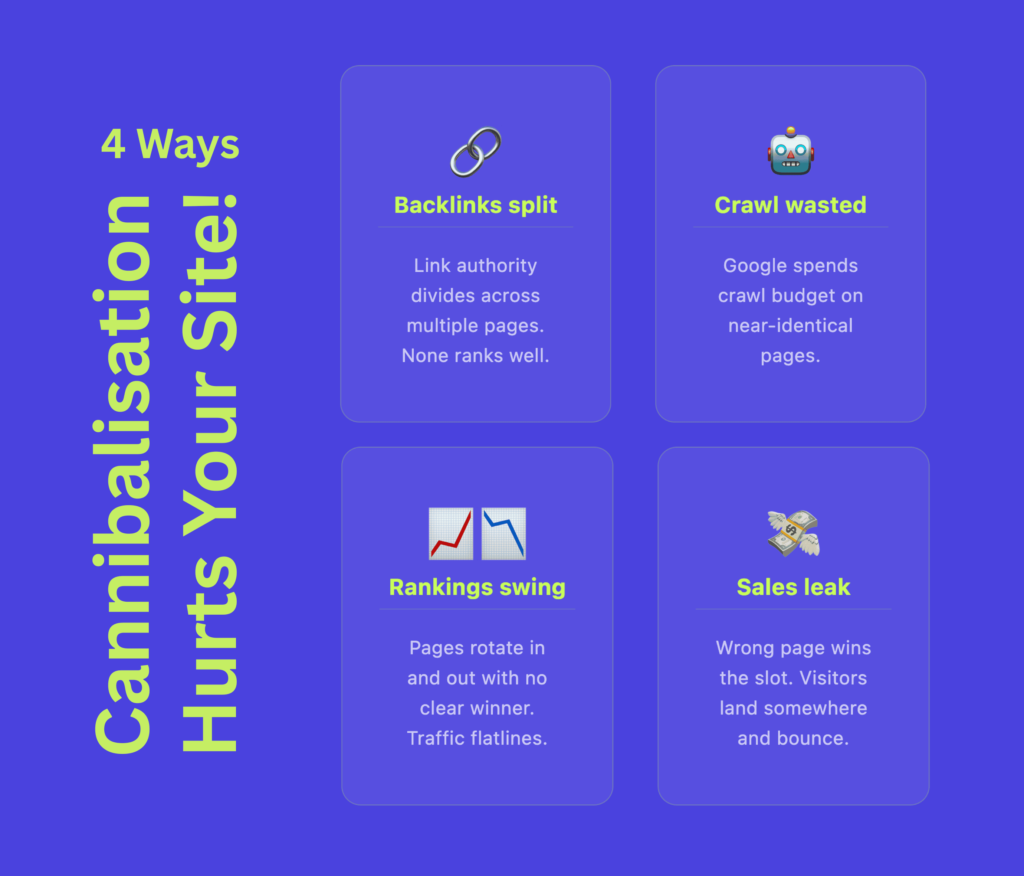
Publishing more content should help your website rank for more searches. But when several pages target the same query and solve the same user need, they can begin competing with each other.
Instead of building one strong result, your website divides relevance, internal links, backlinks and clicks between multiple URLs.
This is called keyword cannibalisation.
It often affects large content websites, ecommerce stores, location-based service websites and teams producing content quickly with AI.
This guide explains how to identify and fix it using Google Search Console, Claude and a GSC MCP.
What Is Keyword Cannibalisation?
Keyword cannibalisation happens when two or more pages from the same website compete for the same search query and the same search intent.
Search intent is the reason behind a search. A person may want to learn, compare options, buy a product, find a business or complete a task.
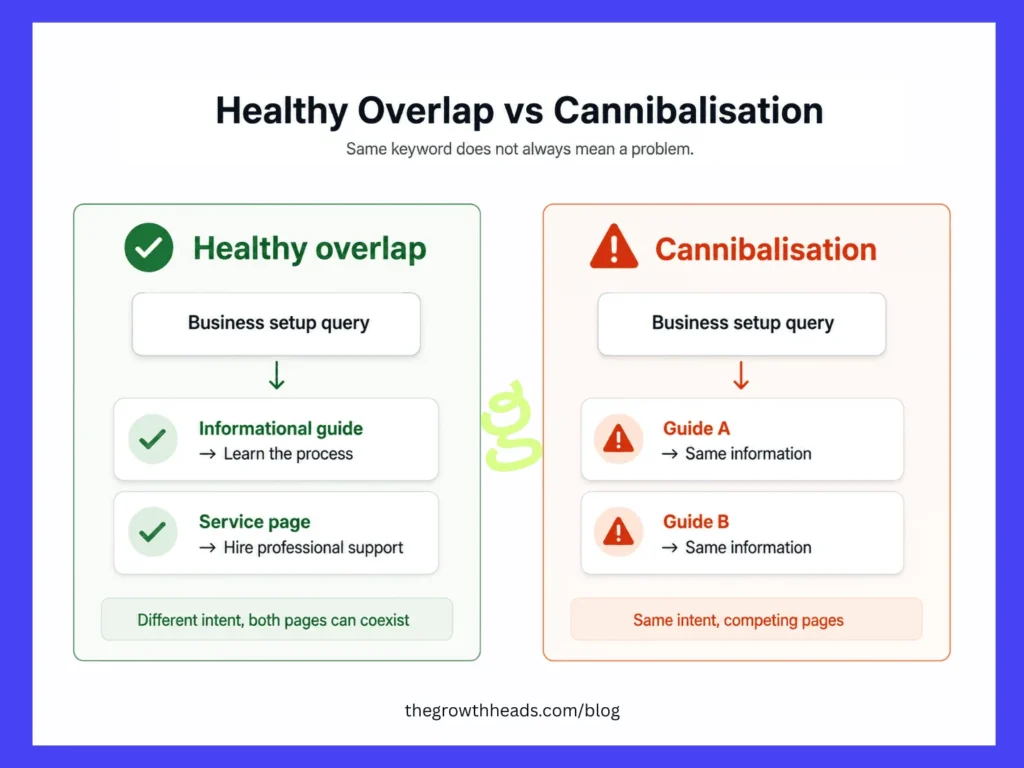
The same keyword can appear on several pages without creating a problem. Cannibalisation becomes a concern when those pages try to give the same answer to the same audience.
Keyword cannibalisation happens when your website does not make it clear which page should be the main result for a particular search intent.
Google may alternate between the pages or rank the URL that is less useful to your business.
It is usually not a Google penalty. It is more often caused by overlapping content, weak internal linking, or unclear website architecture.
A Simple Keyword Cannibalisation Example
Imagine that a business consultancy publishes:
/blog/start-a-business-in-dubai-guide//blog/how-to-set-up-a-company-in-dubai/
Both explain business structures, documents, costs, registration steps and timelines. Their titles are different, but the user need is almost identical.
Google Search Console shows that both URLs receive impressions for searches related to “how to start a business in Dubai”. The first page leads during some weeks, while the second takes over during others. Neither URL maintains a strong position.
This is a likely cannibalisation issue because the pages satisfy the same intent, overlap heavily and repeatedly replace each other. A suitable fix is to combine them under the stronger URL and redirect the weaker one.
Is Ranking Multiple Pages for the Same Keyword Always Bad?
No.
Suppose the same company has:
/services/business-setup-dubai//blog/start-a-business-in-dubai-guide/
| Page | Main purpose |
|---|---|
| Service page | Hire a company to manage the setup |
| Blog article | Learn how business setup works |
These pages can support each other. Before treating them as a problem, ask:
Would a user expect these pages to solve the same problem in the same way?
If the answer is no, you may only need to clarify the role of each page through its title, content, and internal links.
Why Does Keyword Cannibalisation Happen?
1. Similar Content Is Published Over Time
Writers may create new articles without checking what already exists. Slight keyword variations are treated as separate topics even when the search intent is the same.
For example, “best payroll software for small companies” and “best payroll system for small businesses” may belong on one complete page.
2. Old Content Is Replaced Without Handling the Original URL
A new version of a guide, report or yearly article may be published while the old page remains indexable. The older URL may continue ranking because it has more links or history.
3. Blog Posts Compete With Commercial Pages
An informational article may rank instead of a product, category or service page. This matters when the blog attracts users who are ready to buy but offers a weaker conversion path.
4. Ecommerce Pages Create Similar URLs
Product variants, filters and subcategories can create several pages with almost identical products and content.
Our guide on managing product variants in SEO explains when separate URLs are useful and when they create duplication.
5. Location and International Pages Are Too Similar
Businesses sometimes create city or country pages by changing only the location name. These pages need meaningful localisation and clear regional targeting.
Read our guide comparing ccTLDs and subdirectories for international SEO before planning international sections.
6. AI Content Is Published Without a Content Map
AI can speed up content production, but it can also produce several articles that explain the same topic in different words.
Every new topic should be checked against your existing URLs and keyword-to-page map.
Common Signs of Keyword Cannibalisation
Warning signs include:
- The ranking URL repeatedly changes for the same query.
- An old article appears instead of a newer page.
- A blog post ranks instead of the intended service or product page.
- Two similar pages receive impressions, but neither performs strongly.
- An existing page loses clicks after a similar page is published.
- Internal links use the same anchor text for different URLs.
These are investigation signals, not proof. Rankings can also change because of competitors, seasonality or technical issues.
How to Find Keyword Cannibalisation Using Google Search Console
Google Search Console is a useful starting point because it shows which queries are connected to which URLs.
Step 1: Choose a Useful Date Range
Open:
Performance → Search results
Use at least three months of data. For seasonal or lower-traffic websites, six to twelve months is better.
Compare the last three months with the previous three months, or use a year-over-year comparison for seasonal websites.
Step 2: Filter an Important Query
Open the Queries tab and select a valuable non-branded term.
You can also apply a filter such as:
Query contains → business setup Dubai
After selecting the query, open the Pages tab. GSC will show the URLs receiving clicks or impressions for that search.
Step 3: Review the URLs
Check:
- Which page receives most impressions and clicks?
- Is the preferred page ranking?
- Do the pages satisfy the same intent?
- Does one page appear only occasionally?
- Has the leading URL changed between periods?
Multiple URLs do not automatically mean cannibalisation. A secondary page with very little visibility may not be a real concern.
Step 4: Compare the Pages Manually
Review each page’s:
- Title and H1
- Main purpose and search intent
- Content structure
- Page type
- Internal links
- Canonical tag
- Backlinks
- Organic conversions
- Last updated date
Also inspect the current Google results to identify the dominant search intent.
Step 5: Choose the Preferred URL
The preferred page should best satisfy the intent, use a suitable long-term URL and support the correct business goal.
Do not choose it using average position alone.
How to Audit Cannibalisation in Bulk
For a larger website, export query-and-page data through the Search Console API, BigQuery, a Google Sheets connector, a GSC MCP or an SEO platform connected to GSC.
Include:
- Query
- Page
- Date or week
- Clicks
- Impressions
- CTR
- Average position
Where possible, add page titles, canonicals, page types, backlinks, internal links and conversions.
Group the data by query and count the URLs receiving meaningful impressions.
Prioritise cases where:
- Several URLs receive a noticeable share of visibility.
- The pages serve the same intent.
- The leading URL changes over time.
- The wrong page is ranking.
- The query has business value.
There is no official percentage that confirms cannibalisation.
A 95% and 5% impression split may be harmless, while a 55% and 45% split between same-intent pages deserves investigation. These are audit filters, not Google rules.
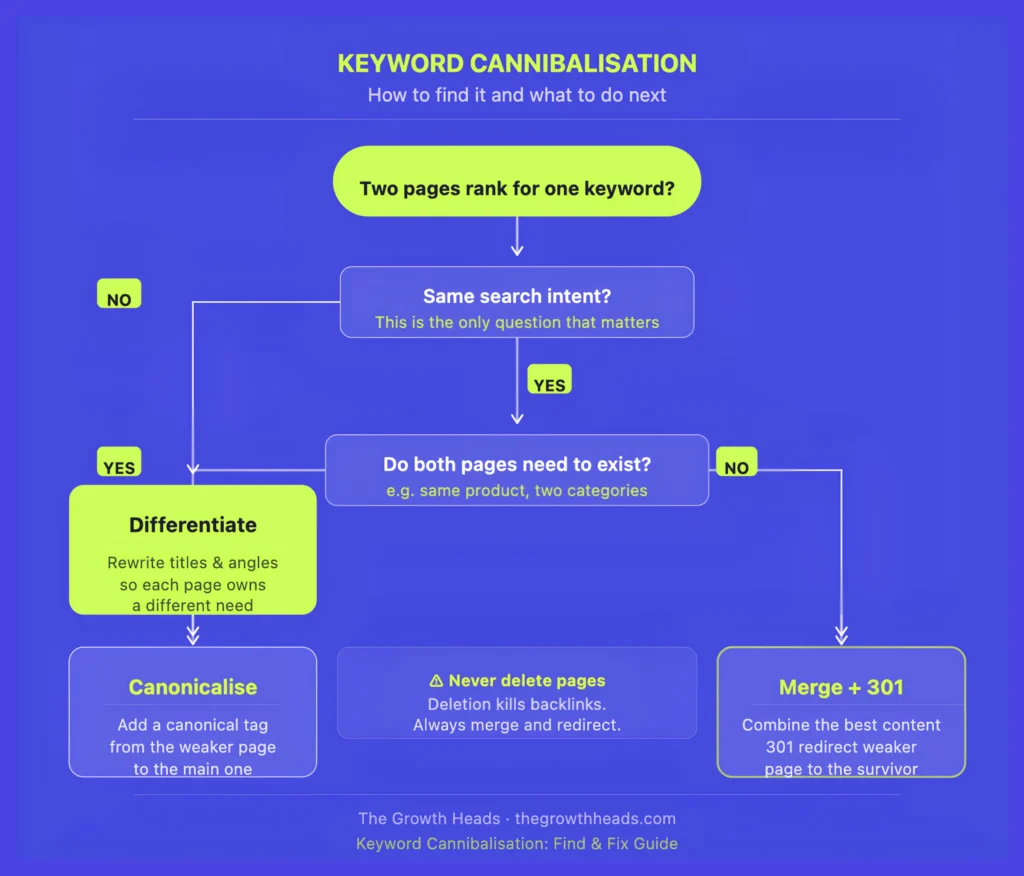
How to Fix Keyword Cannibalisation
1. Merge and Redirect
Use this when both pages solve the same problem and do not need to remain separate.
Choose the stronger URL, move useful content from the weaker page, remove repetition and add a permanent 301 redirect.
Update internal links and remove the redirected URL from the XML sitemap.
Before redirecting, preserve any valuable backlinks, conversions or unique content.
2. Differentiate the Pages
Keep both pages when they can serve different needs.
For example:
- “What Is a Business Licence in Dubai?” explains the concept.
- “How to Apply for a Business Licence in Dubai” explains the process.
- A service page offers professional application support.
Each page needs a distinct purpose, audience, structure and call to action. Changing only the title is not enough.
3. Improve Internal Linking
Use internal links to show which page is the primary resource. Supporting articles should link to the preferred URL using relevant anchor text.
After a redirect, update old links so they point directly to the final destination.
4. Use Canonicals for Duplicate URLs
Canonical tags are suitable for tracking URLs, print versions, parameters and near-identical product variations.
They are not a general solution for two different articles targeting the same intent. Merge or differentiate those pages instead.
5. Use Noindex or Removal Carefully
Noindex may suit thin archives, internal search pages, temporary campaigns and low-value filters.
Remove a page only when it has no useful content, traffic, backlinks or business purpose. Redirect it when a close replacement exists; otherwise, use a proper 404 or 410.
How to Find Cannibalisation Using Claude and a GSC Export
Claude can group a large GSC dataset and identify patterns faster. But it should create a shortlist, not make final redirect decisions.
Export the data, add page-level information, and upload the file to Claude.
Use this prompt:
Act as a senior technical SEO consultant.

Analyse the uploaded Google Search Console query-page data and identify possible keyword cannibalisation.

Do not treat multiple ranking URLs as automatic cannibalisation.

For each query:

1. List URLs receiving meaningful impressions.
2. Calculate click and impression share by URL.
3. Identify repeated URL switching when date data is available.
4. Separate same-intent competition from healthy keyword overlap.
5. Recommend a preferred URL only when the evidence is strong.
6. Suggest one action: merge and redirect, differentiate, improve internal links, review canonical, no action or manual review.
7. Flag missing content, backlink or conversion data.
8. Never recommend deleting or redirecting a page without identifying possible risks.

Return a prioritised table with the query, URLs, evidence, preferred URL, action, confidence level and manual checks required.
Then ask Claude to challenge its findings:
Review the previous analysis critically.

For every high-confidence case, explain what proves that the pages serve the same intent.

Identify possible false positives and downgrade any case where intent, backlinks, conversions or page purpose cannot be confirmed.
This second prompt helps reduce overconfident recommendations.
How to Use a GSC MCP With Claude
MCP, or Model Context Protocol, allows Claude to connect with external tools and data sources.
A Google Search Console MCP lets Claude retrieve GSC performance data directly. This reduces repeated CSV exports and makes ongoing analysis faster.
For the full setup process, follow Suganthan Mohanadasan’s Google Search Console MCP step-by-step setup guide.
It explains how to:
- Create a Google Cloud project
- Enable the Google Search Console API
- Choose OAuth or a service account
- Connect the MCP server to Claude Desktop
- Set the correct Search Console property
After setup, use:
Use the connected Google Search Console data to analyse non-branded queries for the last six months.

Find queries where multiple URLs receive meaningful impressions.

Compare the first three months with the latest three months and identify repeated changes in the leading URL.

Do not confirm cannibalisation from GSC data alone. Mark search intent as unknown when page content has not been reviewed.

Return high, medium and low-confidence candidates with clicks, impressions, CTR, average position, impression share, preferred URL and required manual checks.
Before acting, compare the pages, backlinks, internal links and conversion data. Confirm the preferred URL manually.
Review the security of any third-party MCP. Check the maintainer, use minimum permissions, keep credential files private and avoid unnecessary write access.
Use the MCP to speed up analysis, not to replace SEO judgement.
How to Prevent Keyword Cannibalisation
Maintain a Keyword-to-URL Map
For each important topic, record its query cluster, search intent, preferred URL, page type, target audience and supporting pages.
This gives every important search intent one clear page owner.
Search Before Publishing
Check your website and GSC before approving a new article. Do not look only for the exact keyword; search for pages with the same meaning.
site:example.com "target topic"Build Topic Clusters
Use one main resource for a broad topic and supporting pages for clear subtopics.
For example, a technical SEO audit guide can be supported by separate articles about sitemaps, canonical tags, robots.txt and Core Web Vitals.
Supporting pages should add depth instead of repeating the main guide.
Refresh Before Replacing
An existing URL may already have rankings, backlinks and history. Updating it is often safer than publishing a similar article from zero.
Review Content Regularly
Audit old articles, categories, filters, tags, location pages, campaign pages and programmatic templates every few months.
Final Thoughts
Keyword cannibalisation is not simply the use of the same keyword on several pages.
The real problem is unclear ownership of search intent.
Google Search Console can show which queries are connected to which URLs. Spreadsheets and Claude can make larger datasets easier to review. A GSC MCP can reduce repetitive exports.
But the tools cannot make every decision for you.
Before merging, redirecting or removing a page, review its purpose, content, backlinks, conversions and value to the user.
The goal is not to force only one page to appear for every keyword.
It is to give each important search need one clear, useful and authoritative destination.